> ## Documentation Index
> Fetch the complete documentation index at: https://dev.docs.inworld.ai/llms.txt
> Use this file to discover all available pages before exploring further.
# Instant Voice Cloning
> Create a personalized voice clone in seconds
Inworld's Instant Voice Cloning creates a personalized voice clone in seconds, from as little as 3 seconds of audio. The longer the sample (up to the current 15-second limit), the better the speaker similarity. Also known as zero-shot cloning, it's available to all users through Portal or via API.
For a voice clone that's more similar to the original speaker and more stable, using more audio and an asynchronous training step, see [Professional Voice Cloning](/tts/professional-voice-cloning) Early Access.
Don't have audio samples? Use [Voice Design](/tts/voice-design) to create a voice from a text description instead.
You can also clone a voice in one command with the [Inworld CLI](/tts/resources/inworld-cli): `inworld tts clone sample.wav --name "My Voice"`
To get started, there are two ways to use Instant Voice Cloning:
1. Through [**Inworld Portal**](https://platform.inworld.ai) - Go to [**TTS Playground**](https://platform.inworld.ai/tts-playground) > **Create Voice** > **Clone** and follow the guided flow.
2. Via [API](/api-reference/voiceAPI/voiceservice/clone-voice) or [SDK](#clone-a-voice-via-api) - Useful if you want to clone a lot of voices or expose this capability to your users.
## Clone a Voice in Portal
In Portal, select **TTS Playground** from the left-hand side panel. In the TTS Playground, click **Create Voice** and select **Clone**.
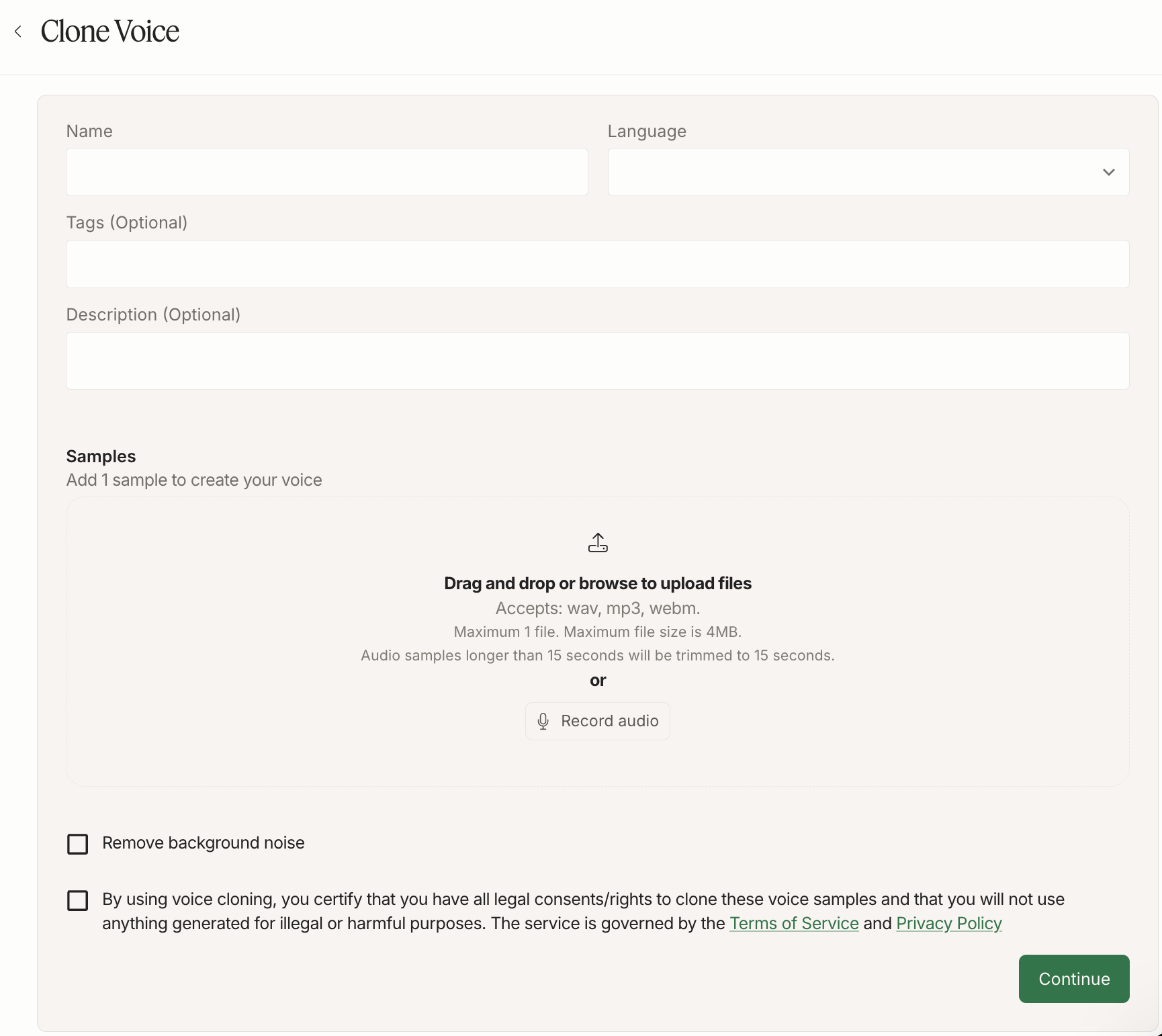 Name your voice and select the language, which should match the audio samples. Select `Other` if you're cloning in an [experimental language](/tts/capabilities/multilingual#experimental-languages).
You can either upload or record audio:
* **Upload**: Drag and drop or browse to upload 1 audio file. Accepted formats: wav, mp3, webm. Maximum file size is 4MB. Audio samples longer than 15 seconds will be automatically trimmed to 15 seconds — we're working on supporting longer prompts soon.
* **Record**: Click "Record audio" and record your audio. You can use the suggested scripts to help guide your recording, or use your own script. For best results, record in a quiet place to minimize background noise, avoid mic noise, and speak with a variety of emotions to capture the full range of the voice.
Enable "Remove background noise" if you wish to remove background noise from your audio. Confirm you have the rights to clone the voice, then click "Continue".
Check out our [Voice Cloning Best Practices](/tts/best-practices/voice-cloning#best-practices-for-instant-voice-cloning) for helpful tips and tricks to improve the quality of your voice clones.
Name your voice and select the language, which should match the audio samples. Select `Other` if you're cloning in an [experimental language](/tts/capabilities/multilingual#experimental-languages).
You can either upload or record audio:
* **Upload**: Drag and drop or browse to upload 1 audio file. Accepted formats: wav, mp3, webm. Maximum file size is 4MB. Audio samples longer than 15 seconds will be automatically trimmed to 15 seconds — we're working on supporting longer prompts soon.
* **Record**: Click "Record audio" and record your audio. You can use the suggested scripts to help guide your recording, or use your own script. For best results, record in a quiet place to minimize background noise, avoid mic noise, and speak with a variety of emotions to capture the full range of the voice.
Enable "Remove background noise" if you wish to remove background noise from your audio. Confirm you have the rights to clone the voice, then click "Continue".
Check out our [Voice Cloning Best Practices](/tts/best-practices/voice-cloning#best-practices-for-instant-voice-cloning) for helpful tips and tricks to improve the quality of your voice clones.
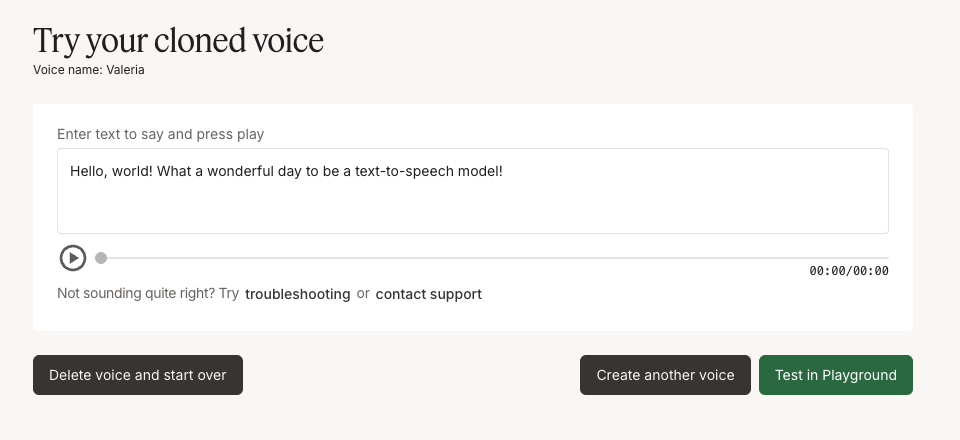 Once voice cloning completes, you'll see the "Try your cloned voice" interface. Enter text in the input field and press play to hear your cloned voice. You can test different phrases to ensure the voice sounds as expected.
If the voice doesn't sound quite right, you can delete the voice and start over, create another voice, or test it in the TTS Playground for more advanced testing options.
The number of cloned voices you can store depends on your subscription plan. See the [Pricing page](https://inworld.ai/pricing) for per-plan limits.
Once voice cloning completes, you'll see the "Try your cloned voice" interface. Enter text in the input field and press play to hear your cloned voice. You can test different phrases to ensure the voice sounds as expected.
If the voice doesn't sound quite right, you can delete the voice and start over, create another voice, or test it in the TTS Playground for more advanced testing options.
The number of cloned voices you can store depends on your subscription plan. See the [Pricing page](https://inworld.ai/pricing) for per-plan limits.
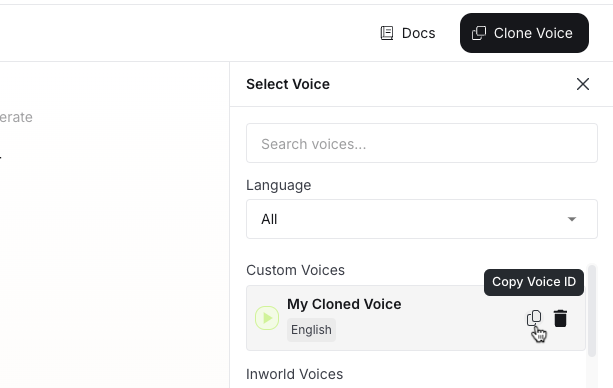 To use the cloned voice via API, copy the voice ID for your cloned voice in TTS Playground. Use that value for the `voiceId` when making an API call. See our [Quickstart](/quickstart-tts) to learn how to make your first API call.
Instant voice cloning may not perform well for less common voices, such as children's voices or unique accents. For those use cases, we recommend [Professional Voice Cloning](/tts/professional-voice-cloning).
## Clone a Voice via API
If you want to automate voice cloning (for example, to support creator onboarding at scale), use the Voice Cloning API.
* **API reference**: [Clone a voice](/api-reference/voiceAPI/voiceservice/clone-voice)
* **Node.js SDK**: [`cloneVoice()`](/tts/node-sdk#clonevoiceoptions) — clone a voice in a few lines with the `@inworld/tts` SDK
* **Python example**: [example\_voice\_clone.py](https://github.com/inworld-ai/inworld-api-examples/blob/main/tts/python/example_voice_clone.py)
* **JavaScript example**: [example\_voice\_clone.js](https://github.com/inworld-ai/inworld-api-examples/blob/main/tts/js/example_voice_clone.js)
Voice cloning has lower rate limits than regular speech synthesis. For details, see [Rate limits](/resources/rate-limits).
## Next Steps
Looking for more tips and tricks? Check out the resources below to get started!
Get a more similar, stable voice clone using a larger set of audio samples.
Learn best practices for producing high-quality voice clones.
Learn best practices for synthesizing high-quality speech.
Explore Python and JavaScript code examples for TTS integration.
To use the cloned voice via API, copy the voice ID for your cloned voice in TTS Playground. Use that value for the `voiceId` when making an API call. See our [Quickstart](/quickstart-tts) to learn how to make your first API call.
Instant voice cloning may not perform well for less common voices, such as children's voices or unique accents. For those use cases, we recommend [Professional Voice Cloning](/tts/professional-voice-cloning).
## Clone a Voice via API
If you want to automate voice cloning (for example, to support creator onboarding at scale), use the Voice Cloning API.
* **API reference**: [Clone a voice](/api-reference/voiceAPI/voiceservice/clone-voice)
* **Node.js SDK**: [`cloneVoice()`](/tts/node-sdk#clonevoiceoptions) — clone a voice in a few lines with the `@inworld/tts` SDK
* **Python example**: [example\_voice\_clone.py](https://github.com/inworld-ai/inworld-api-examples/blob/main/tts/python/example_voice_clone.py)
* **JavaScript example**: [example\_voice\_clone.js](https://github.com/inworld-ai/inworld-api-examples/blob/main/tts/js/example_voice_clone.js)
Voice cloning has lower rate limits than regular speech synthesis. For details, see [Rate limits](/resources/rate-limits).
## Next Steps
Looking for more tips and tricks? Check out the resources below to get started!
Get a more similar, stable voice clone using a larger set of audio samples.
Learn best practices for producing high-quality voice clones.
Learn best practices for synthesizing high-quality speech.
Explore Python and JavaScript code examples for TTS integration.