> ## Documentation Index
> Fetch the complete documentation index at: https://dev.docs.inworld.ai/llms.txt
> Use this file to discover all available pages before exploring further.
# Authentication
> Managing API keys and authentication for Inworld Realtime API
All requests to Inworld's APIs must include an API key in an Authorization HTTP header. All APIs support both Basic and JWT authentication.
## Getting an API key
The fastest way to get an API key is the [Inworld CLI](/tts/resources/inworld-cli):
```bash theme={"system"}
npm install -g @inworld/cli
inworld login
inworld workspace add-key --name my-key # add --write to also allow Voice and Router write endpoints
inworld workspace select-key # make the new key the active one
inworld auth print-api-key # print the Basic (Base64) credential for the Authorization header
```
`--write` only affects write endpoints of the [Voice API](/api-reference/voiceAPI/voiceservice/clone-voice) and [Router API](/api-reference/routerAPI/routerservice/create-router) — other APIs (such as Text-to-Speech and LLM) are not impacted.
This also works for AI coding agents — they can mint a key without leaving the terminal.
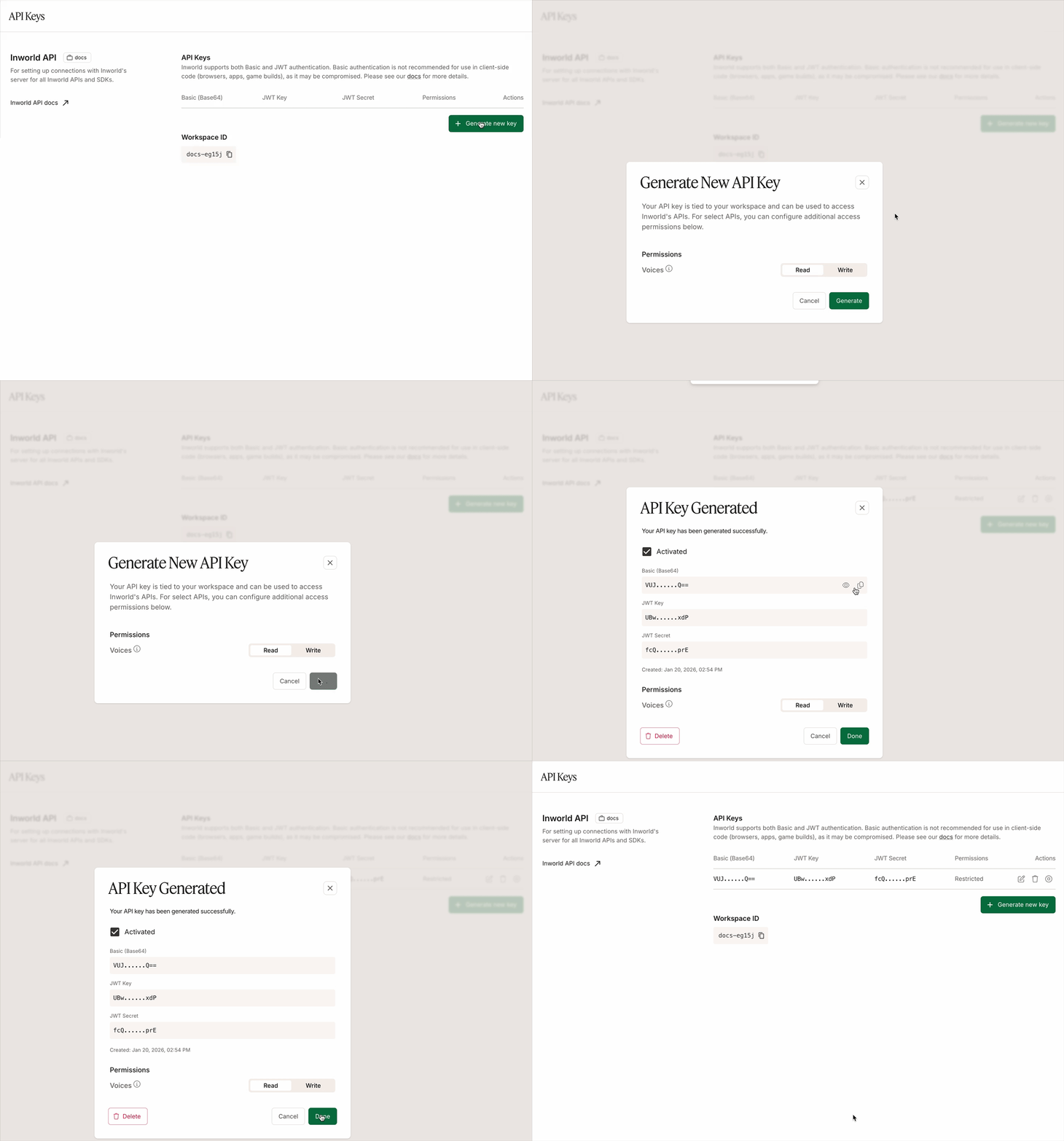
Alternatively, to get an API key from the Portal:
1. Log in to [Inworld Portal](https://platform.inworld.ai/).
2. Click [**API Keys**](https://platform.inworld.ai/api-keys) on the bottom left sidebar.
3. Click **Generate new key** to generate a new API key.
4. Copy the **Basic (Base64)** authorization signature.
 You can also specify for each API key whether it has write permissions to:
* [Voice API](/api-reference/voiceAPI/voiceservice/clone-voice), which enables the API key to be used for POST, PATCH, and DELETE endpoints (clone voice, update voice, delete voice). GET endpoints only require read permissions.
* [Router API](/api-reference/routerAPI/routerservice/create-router), which enables the API key to be used for POST, PATCH, and DELETE endpoints (create router, update router, delete router). GET endpoints only require read permissions.
You can also specify for each API key whether it has write permissions to:
* [Voice API](/api-reference/voiceAPI/voiceservice/clone-voice), which enables the API key to be used for POST, PATCH, and DELETE endpoints (clone voice, update voice, delete voice). GET endpoints only require read permissions.
* [Router API](/api-reference/routerAPI/routerservice/create-router), which enables the API key to be used for POST, PATCH, and DELETE endpoints (create router, update router, delete router). GET endpoints only require read permissions.
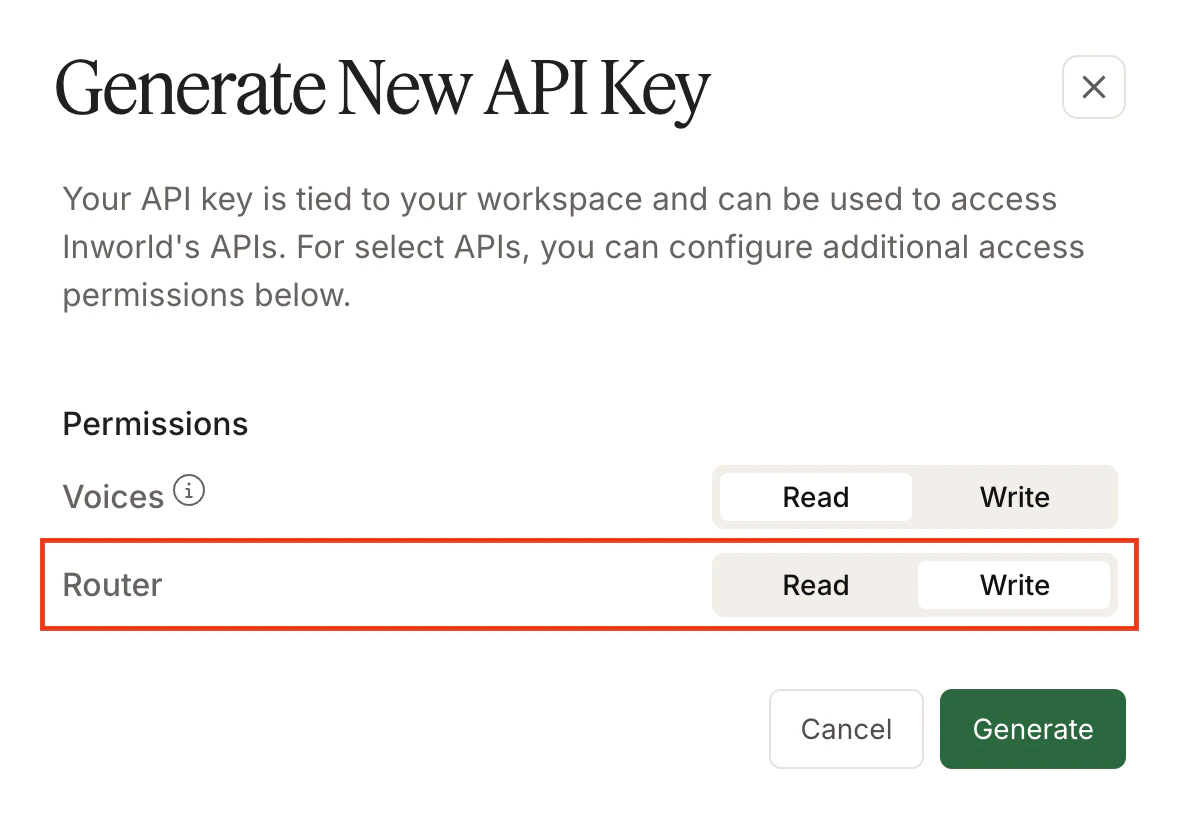 These permissions do not impact other APIs (such as Text-to-Speech and LLM).
## Basic authentication
Do not expose your Base64 API credentials in client-side code (browsers, apps, game builds), as it may be compromised. Please consider JWT authentication for client-side builds.
Basic authentication uses the Base64 encoded credentials to authenticate the request. Below is an example of the header for Basic authentication:
```
Authorization: Basic $INWORLD_API_KEY
```
Make sure to keep your Base64 credentials safe, as anyone with your credentials can make requests on your behalf. It is recommended that credentials are stored as environment variables and read at run time.
## Realtime-only API keys
A Realtime-only API key is a credential built specifically for the Inworld Realtime API. Use it for any voice agent that connects over WebSocket or WebRTC.
### What it covers
* Realtime sessions over [WebSocket](/realtime/connect/websocket) and [WebRTC](/realtime/connect/webrtc)
* Streaming audio in and audio out within a realtime session
* Speech, language, and voice generation that the Realtime API performs for you
For other Inworld APIs, create a Standard API key.
### Create the key
1. Sign in to [Inworld Portal](https://platform.inworld.ai/) and open **API Keys**.
2. Click **Generate new key** and choose **Realtime-only** as the key type.
3. Copy the **Base64** credentials.
Store the credentials in a secret manager (recommended) or as an environment variable on your backend. Read them at runtime, and keep them out of source control and out of client-side code (browsers, apps, game builds).
A key's type is fixed at creation. To use a different key type, please create a new key.
### Authenticate your requests
On your backend, use the key to mint a short-lived JWT. Send the JWT as a Bearer token in the Authorization header when opening a WebSocket or WebRTC connection:
```
Authorization: Bearer $JWT
```
The [Node.js JWT sample app](https://github.com/inworld-ai/inworld-nodejs-jwt-sample-app) shows the full flow. Once you have a JWT, jump to the [WebSocket](/realtime/connect/websocket) or [WebRTC](/realtime/connect/webrtc) connection guide.
These permissions do not impact other APIs (such as Text-to-Speech and LLM).
## Basic authentication
Do not expose your Base64 API credentials in client-side code (browsers, apps, game builds), as it may be compromised. Please consider JWT authentication for client-side builds.
Basic authentication uses the Base64 encoded credentials to authenticate the request. Below is an example of the header for Basic authentication:
```
Authorization: Basic $INWORLD_API_KEY
```
Make sure to keep your Base64 credentials safe, as anyone with your credentials can make requests on your behalf. It is recommended that credentials are stored as environment variables and read at run time.
## Realtime-only API keys
A Realtime-only API key is a credential built specifically for the Inworld Realtime API. Use it for any voice agent that connects over WebSocket or WebRTC.
### What it covers
* Realtime sessions over [WebSocket](/realtime/connect/websocket) and [WebRTC](/realtime/connect/webrtc)
* Streaming audio in and audio out within a realtime session
* Speech, language, and voice generation that the Realtime API performs for you
For other Inworld APIs, create a Standard API key.
### Create the key
1. Sign in to [Inworld Portal](https://platform.inworld.ai/) and open **API Keys**.
2. Click **Generate new key** and choose **Realtime-only** as the key type.
3. Copy the **Base64** credentials.
Store the credentials in a secret manager (recommended) or as an environment variable on your backend. Read them at runtime, and keep them out of source control and out of client-side code (browsers, apps, game builds).
A key's type is fixed at creation. To use a different key type, please create a new key.
### Authenticate your requests
On your backend, use the key to mint a short-lived JWT. Send the JWT as a Bearer token in the Authorization header when opening a WebSocket or WebRTC connection:
```
Authorization: Bearer $JWT
```
The [Node.js JWT sample app](https://github.com/inworld-ai/inworld-nodejs-jwt-sample-app) shows the full flow. Once you have a JWT, jump to the [WebSocket](/realtime/connect/websocket) or [WebRTC](/realtime/connect/webrtc) connection guide.